Palmyn Developer Documentation
Palmyn is a biometric identity platform that lets you protect your site from bots and authenticate real human users — verified by their hand scan, not a password.
There are two products you can integrate independently or together:
human_id and email — a frictionless biometric login without passwords or SMS codes.One backend, two products. Captcha and Login share the same verify flow and token format — the only difference is what your backend does with the verified token. Use the drop-in captcha.js widget for plain bot protection, or the programmatic palmyn-auth.js widget for Login with Palmyn and silent auth.
Quickstart
Get Palmyn Captcha running on your site in under 5 minutes.
Palmyn is in active development. Public self-service registration isn't open yet. To get a test site_key / secret_key pair for an integration trial, email us:
Write to admin@palmyn.com with:
• Your domain (e.g. miapp.com)
• What you want to integrate (captcha, login, or both)
• A short note about the project
We reply within 1–2 business days with your key pair and any setup specifics. During the trial there's no charge and you get direct support from the team.
Once you receive your keys, keep secret_key private — never expose it in frontend code. Store it as an environment variable on your server. The site_key is safe to embed in the widget.
Drop in the widget script and a container. It renders a “No soy un robot” checkbox and scores behavior invisibly — most users pass without any extra step.
<form id="my-form">
  <input type="hidden" name="palmyn_token" id="captcha-token" />

  <!-- auto-renders on any .palmyn-captcha element -->
  <div class="palmyn-captcha"
       data-sitekey="pk_live_a1b2c3d4e5f6..."
       data-callback="onPalmynVerified"></div>

  <button type="submit">Submit</button>
</form>

<!-- auto-inits all .palmyn-captcha elements on load -->
<script src="https://palmyn.com/api/widget/captcha.js" async></script>
<script>
  function onPalmynVerified(token) {
    // token travels with your form to your backend
    document.getElementById('captcha-token').value = token;
  }
</script>When your form is submitted, verify the token using your secret_key. Never trust the frontend alone.
$token     = $_POST['palmyn_token'] ?? '';
$secretKey = getenv('PALMYN_SECRET_KEY'); // sk_live_...

$response = file_get_contents(
    'https://palmyn.com/api/captcha.php'
    . '?q=siteverify'
    . '&secret=' . urlencode($secretKey)
    . '&token='  . urlencode($token)
);

$data = json_decode($response, true);

if (!$data['success']) {
    http_response_code(403);
    die('Verification failed: ' . implode(', ', $data['error-codes'] ?? []));
}

// $data['score'] — float 0.0–1.0 (confidence of being human)
// Continue processing the form...
echo 'Verified! Score: ' . $data['score'];
const https = require('https');
async function verifyPalmyn(token) {
const secret = process.env.PALMYN_SECRET_KEY; // sk_live_...
const url = `https://palmyn.com/api/captcha.php`
+ `?q=siteverify&secret=${encodeURIComponent(secret)}`
+ `&token=${encodeURIComponent(token)}`;
const res = await fetch(url);
const data = await res.json();
if (!data.success) {
throw new Error('Palmyn verification failed: ' + (data['error-codes'] || []).join(', '));
}
return data; // { success, score, hostname, challenge_ts }
}
// Express route example
app.post('/submit', async (req, res) => {
try {
const result = await verifyPalmyn(req.body.palmyn_token);
console.log('Score:', result.score);
res.json({ ok: true });
} catch (err) {
res.status(403).json({ error: err.message });
}
});import os, requests
def verify_palmyn(token: str) -> dict:
secret = os.environ["PALMYN_SECRET_KEY"] # sk_live_...
r = requests.get(
"https://palmyn.com/api/captcha.php",
params={"q": "siteverify", "secret": secret, "token": token},
timeout=5,
)
data = r.json()
if not data.get("success"):
codes = ", ".join(data.get("error-codes", []))
raise ValueError(f"Palmyn verification failed: {codes}")
return data # { "success": True, "score": 0.95, ... }
# Flask example
from flask import request, abort
@app.route("/submit", methods=["POST"])
def submit():
result = verify_palmyn(request.form.get("palmyn_token", ""))
print("Score:", result["score"])
return {"ok": True}That's it! Your site is now protected. Continue reading to understand all the options available.
Register a Site
Every domain that embeds the Palmyn widget needs a registered key pair. Each registered site gets:
| Key | Where it's used | Keep secret? |
|---|---|---|
site_key pk_live_... |
Passed to the widget in your HTML — visible to users | No — it's public |
secret_key sk_live_... |
Used only in your backend to call siteverify |
Yes — never expose |
How to get your keys (development phase).
Palmyn is still in private beta. Self-service registration isn't open yet.
To request a test pair for an integration trial, email
admin@palmyn.com
with:
- The domain you want to register (e.g.
miapp.com) - Whether you'll use Captcha, Login with Palmyn, or both
- Optional: a
redirect_uriif you're integrating Login with Palmyn (e.g.https://miapp.com/auth/palmyn/callback) - Short description of the project
We reply within 1–2 business days with your site_key + secret_key. The trial has no charge and you get direct support from the team.
Tiers
| Tier | Description |
|---|---|
| basic | Standard behavior-based scoring + QR challenge when needed. |
| verified | Requires hand registration — only users with verified_level: 2 can pass. |
Tell us which tier you need in your registration email.
Captcha — How it works
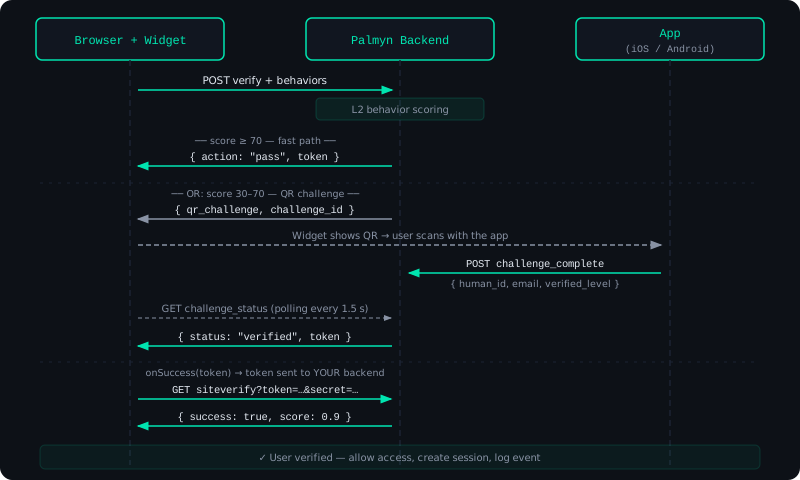
The widget invisibly tracks mouse movement, keyboard timing, and scroll patterns before the user even clicks. Most legitimate users pass automatically without ever seeing a QR code.
Install the Widget
There are two widgets you can use. Both call the same backend and return the same kind of token — pick whichever fits your stack.
Option A — Drop-in widget recommended
A declarative, reCAPTCHA-style checkbox. Add the captcha.js script once and a container with data-* attributes — it auto-renders and runs behavior scoring invisibly. No JavaScript wiring required.
<form id="my-form">
  <!-- your form fields -->
  <input type="hidden" id="palmyn-token" name="palmyn_token" />

  <!-- auto-renders on any .palmyn-captcha element -->
  <div class="palmyn-captcha"
       data-sitekey="pk_live_..."
       data-callback="onPalmynVerified"
       data-theme="light"></div>

  <button type="submit">Submit</button>
</form>

<script src="https://palmyn.com/api/widget/captcha.js" async></script>
<script>
  function onPalmynVerified(token) {
    document.getElementById('palmyn-token').value = token;
  }
</script>
If you can't serve the widget from palmyn.com/api, point it at your backend with data-api on the div, or set window.__PALMYN_API_BASE__ before the script loads. You can also skip data-callback and listen for the palmyn:verified DOM event instead.
Option B — Programmatic widget
For SPAs, custom buttons, or silent auth, use the programmatic palmyn-auth.js widget. You control where it renders and get onSuccess / onError callbacks.
<form id="my-form">
  <input type="hidden" id="palmyn-token" name="palmyn_token" />
  <div id="palmyn-captcha"></div>
  <button type="submit" id="submit-btn" disabled>Submit</button>
</form>

<script src="https://palmyn.com/api/widget/palmyn-auth.js"></script>
<script>
  new PalmynAuth({
    siteKey:   'pk_live_...',
    container: '#palmyn-captcha',
    label:     'Verificar & Continuar',   // optional: customize button text

    onSuccess: function(token) {
      document.getElementById('palmyn-token').value = token;
      document.getElementById('submit-btn').disabled = false;
    },

    onError: function(reason) {
      // reason: 'blocked' | 'expired' | 'failed' | 'error'
      alert('Verification failed. Please try again.');
    },
  });
</script>Important: Always verify the token on your server using siteverify. Never trust the frontend callback alone — a user can forge it.
Verify the Token
After the widget returns a token (via the callback or onSuccess), your frontend sends it to your backend. Your backend calls siteverify with your secret_key.
Request
GET https://palmyn.com/api/captcha.php
  ?q=siteverify
  &secret=sk_live_...
  &token=eyJhb...
Response
{
  "success":      true,
  "score":        0.97,
  "action":       "captcha",
  "hostname":     "miapp.com",
  "challenge_ts": "2026-05-26T14:32:10+00:00"
}
action reflects how the user passed: "captcha" (behavior),
"palm_challenge" (hand scan via QR), or "silent_auth".
{
  "success":     false,
  "error-codes": ["invalid-input-response"]
}
Server-side verification
function palmyn_verify(string $token): array {
    $url = 'https://palmyn.com/api/captcha.php'
         . '?q=siteverify'
         . '&secret=' . urlencode(getenv('PALMYN_SECRET_KEY'))
         . '&token='  . urlencode($token);

    $ctx  = stream_context_create(['http' => ['timeout' => 5]]);
    $body = file_get_contents($url, false, $ctx);
    $data = json_decode($body, true);

    if (!($data['success'] ?? false)) {
        throw new RuntimeException('Palmyn: ' . implode(', ', $data['error-codes'] ?? ['unknown']));
    }

    return $data;
}

// Usage
try {
    $result = palmyn_verify($_POST['palmyn_token'] ?? '');
    // $result['score'] — 0.0 to 1.0
    // Process form...
} catch (RuntimeException $e) {
    http_response_code(403);
    exit($e->getMessage());
}
async function palmynVerify(token) {
const url = new URL('https://palmyn.com/api/captcha.php');
url.searchParams.set('q', 'siteverify');
url.searchParams.set('secret', process.env.PALMYN_SECRET_KEY);
url.searchParams.set('token', token);
const res = await fetch(url.toString());
const data = await res.json();
if (!data.success) {
throw new Error('Palmyn: ' + (data['error-codes'] || []).join(', '));
}
return data;
}
// Middleware example
async function requirePalmyn(req, res, next) {
try {
req.palmyn = await palmynVerify(req.body.palmyn_token || '');
next();
} catch (err) {
res.status(403).json({ error: err.message });
}
}
app.post('/submit', requirePalmyn, (req, res) => {
console.log('Score:', req.palmyn.score);
res.json({ ok: true });
});import os
import requests
from functools import wraps
from flask import request, abort, g
PALMYN_API = "https://palmyn.com/api/captcha.php"
def palmyn_verify(token: str) -> dict:
r = requests.get(
PALMYN_API,
params={
"q": "siteverify",
"secret": os.environ["PALMYN_SECRET_KEY"],
"token": token,
},
timeout=5,
)
data = r.json()
if not data.get("success"):
codes = ", ".join(data.get("error-codes", ["unknown"]))
raise ValueError(f"Palmyn: {codes}")
return data
# Decorator for Flask routes
def require_palmyn(f):
@wraps(f)
def wrapper(*args, **kwargs):
token = request.form.get("palmyn_token") or request.json.get("palmyn_token", "")
g.palmyn = palmyn_verify(token)
return f(*args, **kwargs)
return wrapper
@app.route("/submit", methods=["POST"])
@require_palmyn
def submit():
print("Score:", g.palmyn["score"])
return {"ok": True}Silent Auth
If a user has already completed a palm scan in your site recently (within 24 h), you can skip the QR challenge entirely by passing their Palmyn session token. The user is verified instantly.
Silent auth must be explicitly enabled for your site (set allow_silent_auth: 1 in your site registration). It's opt-in.
Silent auth is only available with the programmatic palmyn-auth.js widget — the drop-in captcha.js always runs a fresh check.
How to enable
While we're in development phase, ping us at admin@palmyn.com and we'll flip allow_silent_auth: 1 on your registered site. Once self-service registration is open, you'll be able to toggle it yourself.
How to use it
When you initialize the widget, pass requireFresh: false and the Palmyn session token you stored after a previous successful verification.
// The palmyn_session was stored after a previous login
const palmynSession = localStorage.getItem('palmyn_session');

new PalmynAuth({
  siteKey:       'pk_live_...',
  container:     '#palmyn-captcha',
  requireFresh:  false,           // allow silent auth
  palmynSession: palmynSession,   // optional — omit if none
  onSuccess: function(token) { /* verify on server */ },
});
The palmyn_session token comes from the Palmyn app after the user completes a hand scan. It is not the secret_key — it is a short-lived token stored by the user's device.
Widget Configuration
Drop-in widget — captcha.js
Configure the declarative widget with data-* attributes on the .palmyn-captcha container.
| Attribute | Description | |
|---|---|---|
| data-sitekey | required | Your public site key pk_live_... |
| data-callback | optional | Name of a global function called with the token. Or listen for the palmyn:verified DOM event (event.detail.token). |
| data-theme | optional | "light" (default) or "dark" |
| data-api | optional | Backend base URL. Falls back to window.__PALMYN_API_BASE__, then https://palmyn.com/api |
Programmatic widget — palmyn-auth.js
Pass these options to new PalmynAuth({ ... }).
| Option | Type | Description | |
|---|---|---|---|
| siteKey | string | required | Your public site key pk_live_... |
| container | string | Element | required | CSS selector or DOM element where the button renders |
| onSuccess | function(token) | required | Called with the verification token when the user passes |
| onError | function(reason) | optional | Called with 'blocked', 'expired', or 'error' |
| label | string | optional | Button label text. Default: "Continuar con Palmyn" |
| requireFresh | boolean | optional | Default true. Set to false to allow silent auth. |
| palmynSession | string | null | optional | Palmyn session token from a previous verification (enables silent auth) |
Login with Palmyn — How it works
Login with Palmyn adds identity to the captcha flow. When a user passes verification, your backend receives not just a score — but a verified identity: a stable human_id, their email, and their verification level.
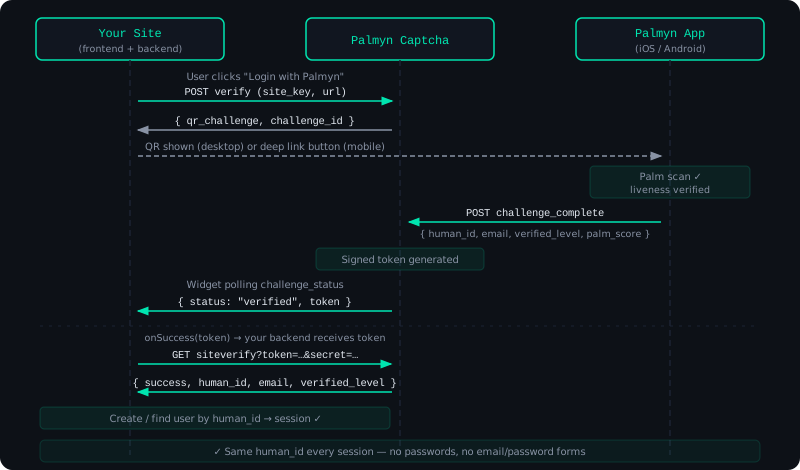
The human_id is the key concept. It's a stable, opaque identifier unique to each person — the same across all your services, but impossible to reverse-engineer back to their real identity.
Add the Login Button
The setup is identical to the captcha widget. Use a different label to make the intent clear:
<div id="palmyn-login"></div>

<script src="https://palmyn.com/api/widget/palmyn-auth.js"></script>
<script>
  new PalmynAuth({
    siteKey:   'pk_live_...',
    container: '#palmyn-login',
    label:     'Continuar con Palmyn',  // or your preferred label

    onSuccess: async function(token) {
      // Send to your backend
      const res = await fetch('/auth/palmyn/callback', {
        method: 'POST',
        headers: { 'Content-Type': 'application/json' },
        body: JSON.stringify({ token }),
      });

      const { sessionCookie, redirect } = await res.json();
      window.location.href = redirect || '/dashboard';
    },

    onError: function(reason) {
      document.getElementById('login-error').textContent =
        reason === 'blocked'
          ? 'Verification failed. Are you human? 🤔'
          : 'Something went wrong. Please try again.';
    },
  });
</script>
Verify & Get User Identity
The siteverify response for Login with Palmyn includes the user's identity fields in addition to the score.
{
  "success":        true,
  "human_id":       "hid_a1b2c3d4e5f6a1b2c3d4e5f6a1b2c3d4",
  "email":          "usuario@ejemplo.com",
  "verified_level": 2,
  "score":          0.97,
  "action":         "palm_challenge",
  "hostname":       "miapp.com",
  "challenge_ts":   "2026-05-26T14:32:10+00:00"
}
Backend handler
function palmyn_login(string $token): array {
    $url = 'https://palmyn.com/api/captcha.php'
         . '?q=siteverify'
         . '&secret=' . urlencode(getenv('PALMYN_SECRET_KEY'))
         . '&token='  . urlencode($token);

    $data = json_decode(file_get_contents($url), true);

    if (!($data['success'] ?? false)) {
        throw new RuntimeException('Verification failed');
    }

    $humanId       = $data['human_id'];        // "hid_..."
    $email         = $data['email'];            // "user@example.com"
    $verifiedLevel = (int)$data['verified_level']; // 0 | 1 | 2

    // Only allow users with biometric verification
    if ($verifiedLevel < 2) {
        throw new RuntimeException('Biometric verification required');
    }

    // Create or find user in YOUR database
    $user = DB::firstOrCreate(
        ['palmyn_id' => $humanId],
        ['email' => $email, 'name' => explode('@', $email)[0]]
    );

    return $user; // set your session cookie etc.
}

// Route handler
try {
    $user = palmyn_login($_POST['token'] ?? '');
    $_SESSION['user_id'] = $user['id'];
    header('Location: /dashboard');
} catch (RuntimeException $e) {
    http_response_code(403);
    echo json_encode(['error' => $e->getMessage()]);
}
// routes/auth.js
app.post('/auth/palmyn/callback', async (req, res) => {
try {
const url = new URL('https://palmyn.com/api/captcha.php');
url.searchParams.set('q', 'siteverify');
url.searchParams.set('secret', process.env.PALMYN_SECRET_KEY);
url.searchParams.set('token', req.body.token || '');
const data = await fetch(url.toString()).then(r => r.json());
if (!data.success) throw new Error('Verification failed');
const { human_id, email, verified_level } = data;
// Only allow biometric-verified users
if (verified_level < 2) {
return res.status(403).json({ error: 'Biometric verification required' });
}
// Upsert user in your DB
const user = await prisma.user.upsert({
where: { palmynId: human_id },
create: { palmynId: human_id, email },
update: {},
});
// Set session
req.session.userId = user.id;
res.json({ redirect: '/dashboard' });
} catch (err) {
res.status(403).json({ error: err.message });
}
});# views/auth.py
import os, requests
from flask import request, session, redirect, abort
@app.route("/auth/palmyn/callback", methods=["POST"])
def palmyn_callback():
token = (request.json or {}).get("token", "")
r = requests.get(
"https://palmyn.com/api/captcha.php",
params={
"q": "siteverify",
"secret": os.environ["PALMYN_SECRET_KEY"],
"token": token,
},
timeout=5,
)
data = r.json()
if not data.get("success"):
abort(403, "Verification failed")
human_id = data["human_id"] # "hid_..."
email = data["email"] # "user@example.com"
verified_level = int(data["verified_level"]) # 0 | 1 | 2
if verified_level < 2:
abort(403, "Biometric verification required")
# Upsert user in your DB
user = User.query.filter_by(palmyn_id=human_id).first()
if not user:
user = User(palmyn_id=human_id, email=email)
db.session.add(user)
db.session.commit()
session["user_id"] = user.id
return {"redirect": "/dashboard"}Verification Levels
Each user has a verified_level that reflects how far they've completed the Palmyn identity process.
Most sites should require verified_level >= 2 for Login with Palmyn. Level 1 is useful for gating low-risk features while the user sets up biometrics.
Mobile Deep Link
When the Palmyn widget detects a mobile browser, it automatically replaces the QR code with an "Open Palmyn App" button that deep links directly to the challenge.
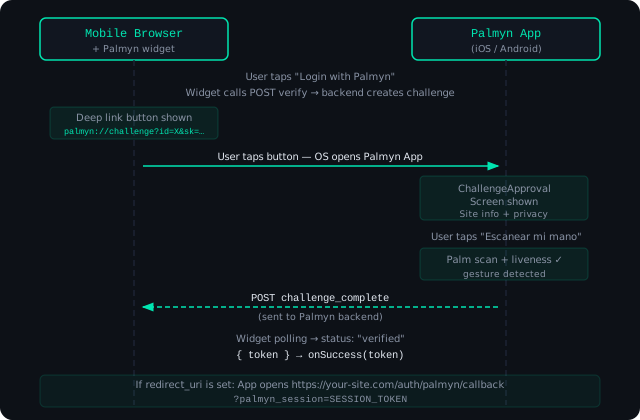
If your site is registered with a redirect_uri, the Palmyn app will automatically redirect to it after the scan:
https://miapp.com/auth/palmyn/callback?palmyn_session=TOKEN_HEREThe palmyn:// deep link only works if the user has the Palmyn app installed. Make sure to handle the case where the link doesn't open — display a fallback QR for desktop or instructions to install the app.
API Reference — captcha.php
Base URL: https://palmyn.com/api/captcha.php
POST verify public
Called by the widget when a user interacts with the button. Returns an action decision.
| Field | Type | Description |
|---|---|---|
| q | string | Must be "verify" |
| sitekey | string | Your public pk_live_... key |
| behavior | array | Event array collected by the widget |
| device | object | Device fingerprint collected by the widget |
| url | string | Current page URL |
| require_fresh | boolean | Default true. Set false to allow silent auth. |
| palmyn_session | string? | Existing session token for silent auth |
POST challenge_status public
Polled by the widget to check if the user completed the QR challenge.
| Field | Type | Description |
|---|---|---|
| q | string | Must be "challenge_status" |
| challenge_id | string | Challenge ID returned by verify |
GET siteverify server-to-server
Validates a token returned by the widget. Call from your backend only.
| Param | Type | Description |
|---|---|---|
| q | string | Must be "siteverify" |
| secret | string | Your private sk_live_... key |
| token | string | Token received from widget onSuccess |
POST challenge_complete mobile app
Called by the Palmyn app after a successful palm scan. Not for third-party use.
POST get_site_info public
Returns the domain and tier for a site_key. Used by the app to display the site name before scanning.
| Field | Type | Description |
|---|---|---|
| q | string | Must be "get_site_info" |
| site_key | string | The site's public key |
POST register_site admin
Registers a new domain. Requires the admin secret.
| Field | Type | Description |
|---|---|---|
| q | string | Must be "register_site" |
| domain | string | Domain to authorize, e.g. miapp.com |
| tier | string | "basic" or "verified" |
| admin_secret | string | Your PALMID_ADMIN_SECRET from .env |
| redirect_uri | string? | Callback URL for mobile deep link flow |
| allow_silent_auth | int? | 0 or 1 — enable silent auth |
API Reference — identity.php
Base URL: https://palmyn.com/api/identity.php
These endpoints are for users of the Palmyn mobile app (not for third-party site integrators).
POST check_auth_session public
Validates a Palmyn session token. Useful for backends that want to check session validity directly.
| Field | Type | Description |
|---|---|---|
| q | string | Must be "check_auth_session" |
| session_token | string | Token from the Palmyn app after a hand scan |
{
  "code": 200,
  "result": {
    "valid":          true,
    "human_id":       "hid_a1b2c3...",
    "email":          "user@example.com",
    "verified_level": 2,
    "expires_at":     1748397000
  }
}
Error Codes
| Code / error-code | Meaning |
|---|---|
| invalid-input-secret | The secret_key passed to siteverify is wrong or doesn't exist |
| invalid-input-response | The token is malformed, expired, or already used (tokens are single-use) |
| invalid_site_key | The site_key in the widget doesn't match any registered site |
| origin_not_allowed | The request Origin doesn't match the domain registered for this site_key |
| challenge_not_found | The challenge_id doesn't exist or expired |
| challenge_expired | The 3-minute challenge window passed without completion |
| unauthorized | Admin endpoint called without a valid admin_secret |
HTTP status codes
| Status | Meaning |
|---|---|
| 200 | Success — check the success / code field in the response body |
| 400 | Bad request — missing or invalid parameters |
| 401 | Unauthorized — invalid JWT or admin secret |
| 405 | Method not allowed — use POST (or GET for siteverify) |